
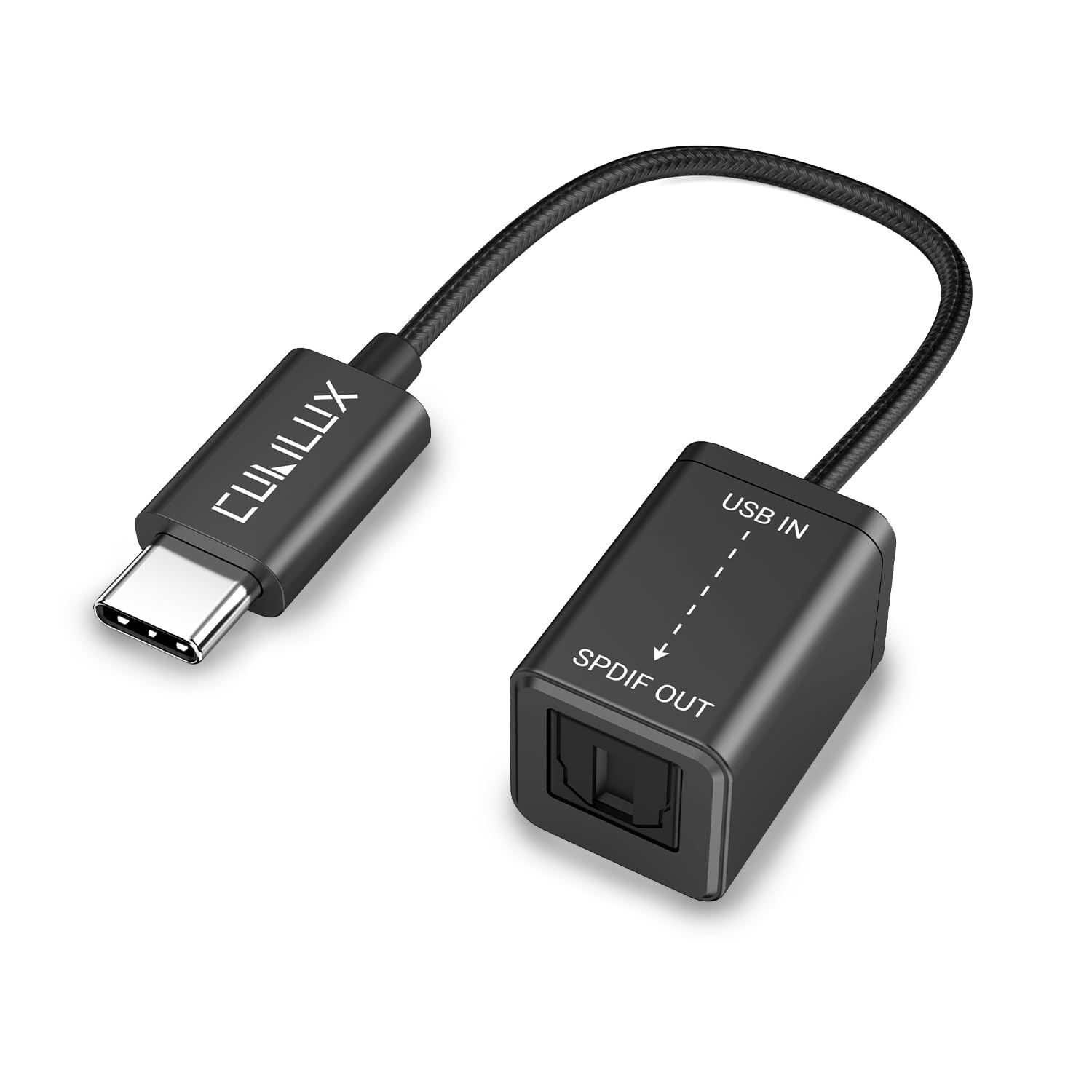

- 【Instantly Connect your USB C Devices to S/PDIF Sound System】Cubilux USB C to S/PDIF Optical Audio Converter lets you easily connect your USB C smartphone, laptop or computer to Soundbar, Home audio system, external DAC, Amplifier, Preamp or Speaker to enjoy lossless surround sound music, no need for bulky cable connection or set up.
- 【Crystal Clean Hi-Res Sound】 The USB Type C to TOSLINK Connector delivers crisp and clear High-Resolution sound at 48KHz/24-bit, 96KHz/24-bit, 192KHz/24-bit with great clarity and rich audio details.
- 【Plug & Play】 No driver required; no need for external power. Works with Ipad, Android, Windows, Mac OS devices with USB Type C or Thunderbolt 3/4 port, and compatible with MacBook Pro/Air, iMac, Mac Pro/Mini, ipad,linux. Please Note: This adapter is not compatible with iPad.
- 【Compact and Durable】 Made with Aluminum alloy case and braided cable, the adapter could isolate EM/RF interference and offer great durability as well. Measured at 0.6in x 0.6in x 8in (cable included), this adapter is super portable to carry.
- Important Note: The MacOS devices (Ipad,MacBook, iMac) will ONLY output stereo sound by default since the system could NOT decode surround sound on its own. To output 5.1/7.1 surround from MacOS, please use surround sound media player like “Kodi”.
Product Description
Cubilux USB C to S/PDIF Optical Audio Converter
Cubilux USB C to TOSLINK (S/PDIF) Optical AUX Dongle sends the digital audio signal from USB C or Thunderbolt 4/3 smartphones, laptops, computers to speaker, home sound system, amplifier or other output components to deliver a more natural sound with rich details, better clarity and superior sonic accuracy.
- Support Lossless Hi-Res Sound up to 192 KHz/24-bit
- Aluminum Alloy Case with Sturdy Braided Cable for Durability
- Eliminate Ground Noise and Signal Interference
- Compact Size
*Please note:
- This adapter connects with digital audio components with an optical audio cable (S/PDIF, Toslink) and does NOT support coaxial cable.
- This adapter is NOT compatible with iPad.
- This adapter does NOT support volume adjustment on the output devices, please adjust the music volume through the receiver.
- This adapter does NOT support 7.1 surround sound due to the limitation of the optical cable.
Setup Instruction
For Windows
Please follow the steps to set up the adapter:
- Right click the “Speaker” icon on the bottom right corner of taskbar to open sound settings.
- Open the “Sound Control Panel” on the right side of the “sound settings” window.
- Right click the “SPDIF Interface” to open the “Properties”.
- Tick “DTS Audio” and “Dolby Digital” and you are good to go.
For MacOS
Since MacBook is not able to decode surround sound on its own, you will also need a media player that support surround sound, for instance, “Kodi” for MacOS, to play 5.1 audio.
- Note: The adapter is for audio signal transmission ONLY and CANNOT convert non-surround sound audio into surround sound audio, which means you will also need 5.1 media files and receivers/amplifiers that support 5.1 surround sound to set up 5.1 audio system.
Lossless Sound without Noises
The adapter conveys digital audio signal through optical TOSLINK (S/PDIF) cable and ensures optimal signal transfer and higher fidelity audio without the interference of ground noise or static, providing beautiful sound without signal loss and enhancing the audio experience of watching movies, listening music and gaming.
Hi-Res Surround Sound
Support 48KHz/24-bit, 96KHz/24-bit, 192KHz/24-bit audio stream and crystal clear multi-channel surround sound including Dolby Digital 5.1, DTS Audio, DTS 96/24, LPCM etc.
Solid Construction
Full Aluminum alloy and braided cable provide great durability for daily use. The aluminum shell ensures zero signal interference for crisps sound.
Wide Compatibility
Suitable for connecting USB C Phone, Computer, Laptop to TOSLINK or S/PDIF optical output components like Soundbar, Speaker, Home Theatre Audio System, AV amplifier/receiver, audio mixer etc.
Compatible with:
- For Mac 2021 M1 Pro 16-Inch・2021 M1 Pro 14-Inch・2021 M1 Max 16-Inch・2021 M1 Max 14-Inch・2020 M1 13-Inch・2020 13-Inch・2019 Touch 13/15-Inch・2019 16-Inch・2018 Touch 13/15-Inch・2017 Touch 13/15-Inch・2017 13-Inch・2016 Touch 13/15-Inch・2016 13-Inch
- For Samsung Galaxy Z Fold3 5G・Z Fold2 5G・Z Flip3 5G・Z Flip 5G・Z Flip・S21+ 5G・S21 Ultra 5G・S21 5G・S20+ 5G・S20+・S20 Ultra 5G・S20 Ultra・S20 FE 5G・S20 FE・S20 5G UW・S20 5G・S20・S10 Lite・Note 20 Ultra 5G・Note 20 Ultra・Note 20 5G・Note 20・Note 10+ 5G・Note 10+・Note 10 5G・Note 10・Fold 5G・Fold
- For Intel NUC Computer
and most USB C/Thunderbolt 4/3 laptops or computers.










Reviews
There are no reviews yet.