
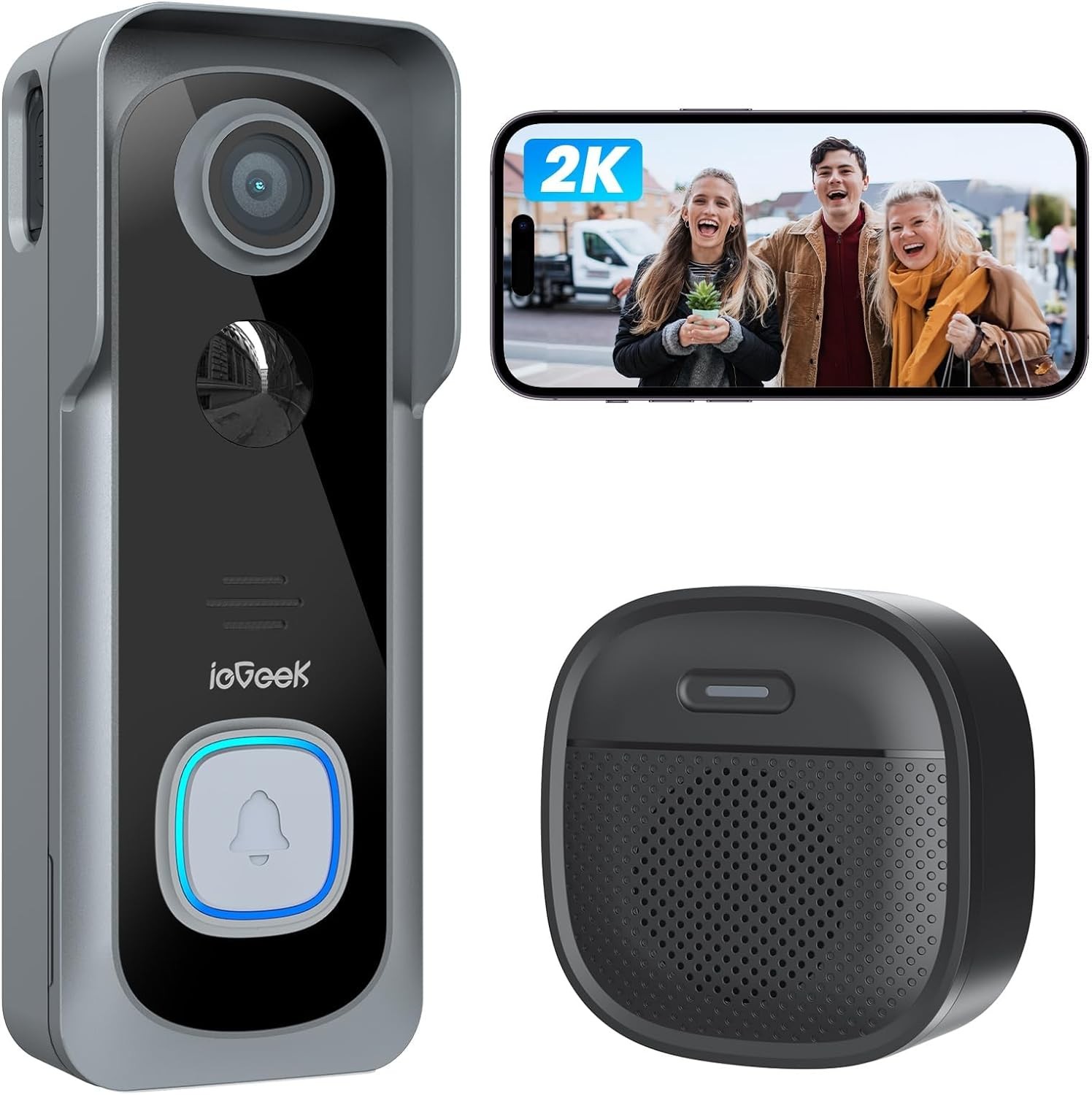

- No Subscription Fee & Multiple Security Protections: No monthly fee is needed for ieGeek doorbell camera. You can choose to use a Micro memory card as local storage. ieGeek Cam APP also provides lifetime free cloud storage (Note: Video record 6s & 7 days loop coverage) for extra security. Even if someone corrupts the local storage, free cloud storage records will provide you with enough information. Double protection gives you peace of mind. ((Works with Alexa)
- 100% Wireless & Faster Installation: No need to deal with any sockets or messy wires, it only takes 3 minutes to complete the connection and installation wherever you need it! ieGeek Doorbell Camera Wireless is powered by 5600mAh battery and connects to the network via 2.4Ghz WiFi. Under laboratory environments, the wireless doorbell works 2 months with 20 triggers a day. (May change due to environment and frequency). ieGeek offers a 2-year warranty, Just shop with confidence
- 2-Way Audio & Voice Changer: The wifi doorbell camera allows you see and speak with the person outside. Imagine how much fun it would be to use a strong male voice to scare away strangers at the door or use a clown voice to make a light-hearted joke with child You can also choose pre-recorded voice messages(up to 3) to quickly reply when you are busy with sth. Ideal protection and gift for the elderly, children and women living alone.
- User friendly & Humanized ieGeek Cam APP: No matter when and where you are, you can remotely see the scene at your doorstep and share the doorbell screen with your family. ieGeek Cam App is very easy to navigate and use. Adjusting sensitivity and turning on humanoid recognition can significantly reduce false alarms and reduce battery consumption. Personalize the surveillance area to avoid recording neighbors’ scene
- PIR Motion Detection & Real-time Alert: The ieGeek smart doorbell with camera features a patented motion detector with a monitoring range of up to 20ft. When motion is detected, it will send a notification to your phone in 3s and record footage of visitors who approach your door. You can choose to talk to visitors or turn on the alarm to warn uninvited guests
Product Description
ieGeek Video Doorbell
Support both CloudEdge APP or ieGeek Cam APP
Not support RTSP / ONVIF / NVR / FTP
Only Support 2.4Ghz Wifi( Not support 5Ghz Wifi)
Why choose ieGeek Storage Service?
- Support Micro Memory Card (Max 128GB)
- Provide Free Basic Cloud Storage (Video Record 6s & Save for 7 Days)
Ideal gift for your lover, parents and family.
ieGeek Home Security System
Manage your security camera device by same APP. (ieGeek Cam or CloudEdge)
- Home security is in your palm.
3 Mintues to Complete Installation & Setting
- The video showcases the product in use.The video guides you through product setup.The video compares multiple products.The video shows the product being unpacked.
Where is the memory card slot?
Install your micro memory card
Please refer to the following steps:
- Insert pin into the hole at the bottom of the doorbell
- Take apart doorbell from bracket
- The card slot is on the left side of doorbell
- The video showcases the product in use.The video guides you through product setup.The video compares multiple products.The video shows the product being unpacked.
Tips for Connection
Connect doorbell to wifi by moblie phone
- ieGeek Bell J9 doorbell only supports 2.4Ghz Wifi.
- Please ensure that the WiFi signal strength is above 80%. The first connection can be completed near the router.
- Please avoid using WiFi passwords with special characters.
- The video showcases the product in use.The video guides you through product setup.The video compares multiple products.The video shows the product being unpacked.
Tips for Installation Position
Install doorbell to door or wall
- It is recommended that the doorbell be installed at a height of 4 feet (120 cm).
- Please avoid obstructions or reflective objects in front of the doorbell.
- The video showcases the product in use.The video guides you through product setup.The video compares multiple products.The video shows the product being unpacked.
Tips for doorbell chime
Paring chime to doorbell
- Chime and the doorbell are paired by default. If you find that the connection is disconnected, you can refer to the video steps to pair them manually.
- One doorbell can be paired with multiple chimes.
4 Steps to Get FREE Cloud Storage
1.Go to Setting Menu
2.Select Cloud Storage
3.Scroll Down the Cloud Page
4.Click the Slider to Activate
Disguise Your Voice, Hide Your Identity
Use strong male voice to scare away strangers at the door or use clown voice to play with your child
Choose Quick Voice Message
Answer the door with pre-recorded voice messages during busy times. (Max 3 messages)
3s Real-Time Alerts
You won’t miss any event with PIR motion detection when someone visits or lingering.
Monitor What You Are Concerned
- Free feature: Humanoid recognition
- Paid features: Pet /vehicle/package(you can choose join or not)
Intelligent Custom Detection
Adjust detection sensitivity and area through APP, reduce useless alarms and avoid frequent disturb.
Work with Alexa
Ask Alexa to show you a live feed of your home security cameras outdoor through voice commands.
Clear Vision Day & Night
The 1080P HD and infrared night vision function makes it clearly visible at night(max distance: 8M).
Wireless Indoor Chime
Stand-alone and placeable chimes let you know visitors are coming no matter where you are at home.
Share with Your Family
ieGeek wireless doorbell supports to share screens with unlimited users. Know your family’s security
Why can’t I connect my doorbell to WiFi?
1. ieGeek doorbell works with 2.4Ghz Wifi (NOT SUPPORT 5Ghz WiFi).
2. Wifi signal is not good. It is recommended to use it in a location where the WiFi strength is greater than 80% (the APP will automatically detect and display it).
Are there any subscriptions fees?
No. You can use a local Micro memory card for storage without any additional fee.
At the same time, our ieGeek Cam APP provides lifetime free cloud storage.
(Video recording time is 6 seconds, cloud recording is saved for 7 days).
How to install Micro memory Card?
Use the included pin to insert into the small hole at the bottom of the doorbell to remove the doorbell from the bracket.
The memory card slot is on the left side. (Normally it will be covered by the bracket for protection).
Does the doorbell support wired installation?
No. The latest version of the J9 battery doorbell does not support wired installation.
What kind of Micro memory card should I configure for this doorbell camera?
The Video Doorbell supports Micro memory cards up to 128GB. We recommend that you use genuine brand memory cards. Requirement Condition: Class10 reading and writing speed requirements and FAT32 file format, being formatted before use.






Reviews
There are no reviews yet.